Most password advice is stuck in the past. Add a symbol, swap a letter for a number, change it every 90 days. Modern guidance from standards bodies points the other way: what protects you is length, uniqueness, and not using a password that attackers already have in their lists. A long random password you never reuse, stored in a password manager, beats a short clever one you use everywhere.
This guide shows both practical routes. Route one: generate a genuinely random password with the free Password Generator on Ovatly, which uses your browser's cryptographic random source and sends nothing anywhere. Route two: build a passphrase from several randomly selected words, long enough to be strong and structured enough to remember. Then it covers the two habits that matter more than either: a different password for every account, and multi-factor authentication on the accounts that count.
Contents
- Quick answer
- What actually makes a password strong
- Route one: generate a random password
- Route two: build a passphrase you can remember
- Worked example: a famous passphrase, and why its top score must not be trusted
- The habits that matter most: uniqueness, managers, MFA
- Limitations and honest cautions
- Common mistakes
- Troubleshooting
- FAQs
- Conclusion
- References
Quick answer
A strong password is long: at least 15 characters when it is the only factor protecting the account (the floor set by the current United States guidance, NIST SP 800-63B-4), and longer is better. It is unique to one account, and not built from personal details or common patterns. The easiest way to get one is to generate it: open the Password Generator, keep the default length of 20 characters with all character types enabled, click generate, and save the result in a password manager. If you must memorise a password, use a passphrase of randomly selected words (at least six for your master passphrase, per the EFF guidance explained below). Whatever you create, you can run it through the Password Strength Checker as a rough estimate of length and pattern strength only; the checker does not screen against known or breached passwords, a limitation the worked example below demonstrates. Never reuse a password on another site, and turn on multi-factor authentication for email, banking and other important accounts.
What actually makes a password strong
Attackers guess passwords two ways. Online, they try the most common passwords and anything leaked from other breaches, which is why "password123" and reused passwords fall instantly. Offline, with a stolen password database, they can test enormous numbers of guesses with fast hardware, and then only the total number of possibilities protects you. That total grows with length and with the size of the character pool: every extra character multiplies the work.
This is why length beats cleverness. A short password with a symbol swapped in (P@ssw0rd style) follows patterns attackers test early. A long string, whether random characters or several unrelated words, sits in a vastly larger space of possibilities. The United States standards body NIST sets the current benchmark in SP 800-63B-4 (2025), the latest revision of its digital identity guidelines. Its requirements are plain: passwords used as the only login factor must be at least 15 characters (the 8-character floor applies only when the password is one part of multi-factor authentication); systems should accept at least 64 characters so long passphrases fit; mandatory composition rules (a required symbol, a required digit) are prohibited; routine forced password changes are prohibited, with changes required on evidence of compromise instead; and new passwords must be screened against blocklists that cover commonly used, expected and compromised passwords. Length, uniqueness and screening do the work that symbol-swapping theatre never did.
Strength numbers need honest framing. Tools estimate strength in "bits of entropy", a way of expressing how large the guessing space is. Estimates assume the attacker does not know how the password was built, which is one more reason random generation and genuinely unrelated words matter, and why no estimate is ever a guarantee.
Route one: generate a random password
- Open the Password Generator. It loads with sensible defaults: 20 characters, with lowercase, uppercase, digits and symbols all enabled, and ambiguous characters (the ones easy to misread, like 0 and O) excluded.
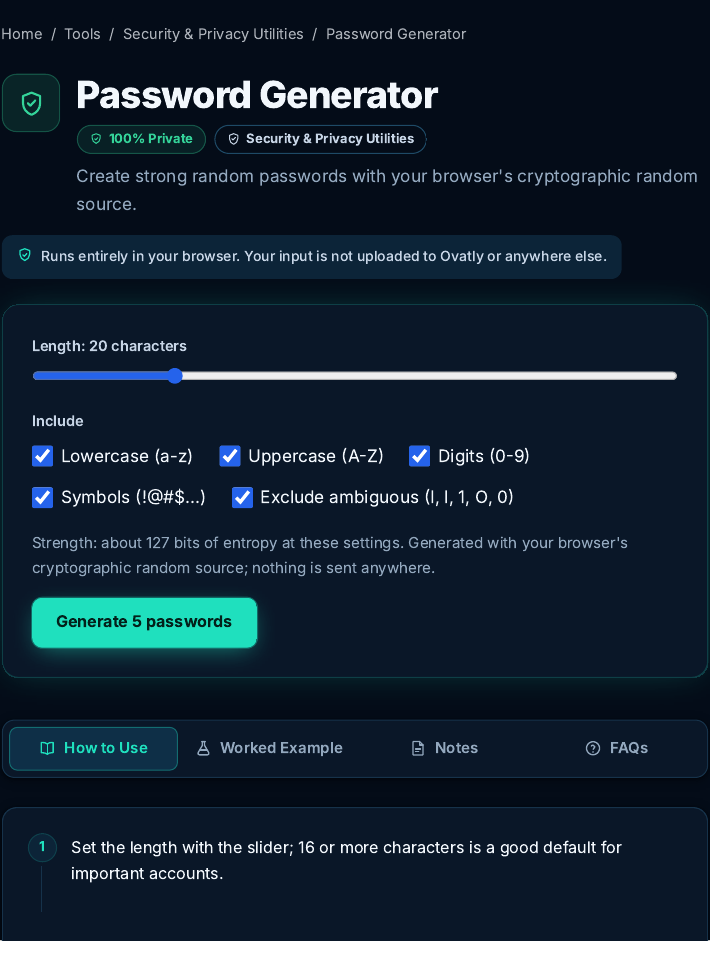 The generator at its defaults. Screenshot: genuine capture from the live Ovatly staging website, 9 November 2026.
- Click the generate button. The tool produces five passwords at once so you can pick one, and shows the strength of the current settings. At the defaults it reports about 127 bits of entropy.
- Copy the password you choose straight into the sign-up form or your password manager. Do not type it into other websites "to check it", and do not reuse it anywhere else.
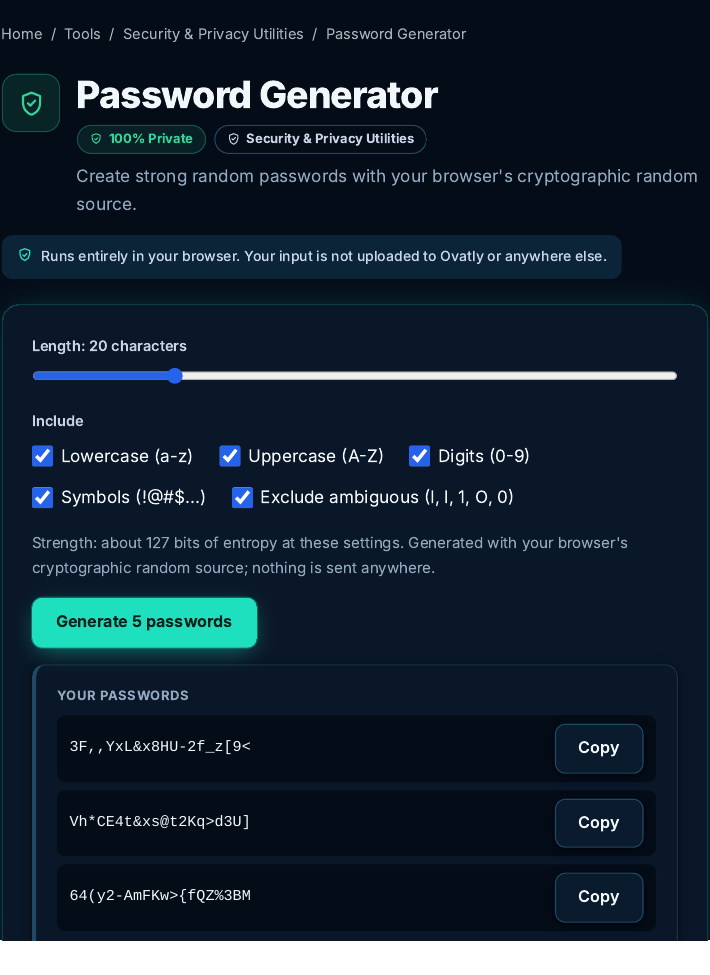 Five disposable examples generated for this guide. They were created for demonstration, are not used on any account, and you should generate your own rather than copy these. Screenshot: genuine capture from the live Ovatly staging website, 9 November 2026.
A note on trust, since a password generator is only worth using if its randomness is real: for this guide we inspected the generator's code. Its randomness comes from the Web Crypto API (crypto.getRandomValues), the cryptographic random source built into your browser, and the code states this explicitly and never uses the weaker Math.random. The generated passwords are created on your device and are not sent to Ovatly or anywhere else; the tool page says the same in its own words.
Route two: build a passphrase you can remember
Some passwords you have to type from memory: your computer login, and above all the master password for your password manager. For those, use a passphrase of randomly selected words: at least six of them for the master passphrase. The six-word figure is the recommendation of the Electronic Frontier Foundation's dice-based passphrase method (EFF), and it is worth keeping the sources distinct: NIST sets requirements for the systems that handle passwords (the length floor, screening, no composition rules), while the six-word passphrase is the EFF's practical guidance for people, not a NIST rule. The decisive property is not that the words feel unrelated; it is that they are selected randomly. Choose them with dice against a published wordlist, or let a generator pick them, and accept the odd result. Words you choose yourself, because they are memorable, connected or pleasing, cluster in predictable ways, and phrases from quotes, lyrics and slogans are patterns attackers already hold. Randomly selected words are what turn a passphrase into a genuinely large guessing space that a human can still hold in mind. Never use a published example passphrase, from this article or anywhere else: if it is in print, it is in the dictionaries.
Invent your own words for real accounts. Never use the famous examples from articles (including this one) as an actual password, because attackers' dictionaries include them.
Worked example: a famous passphrase, and why its top score must not be trusted
This example exists to demonstrate a limitation, and it matters. We typed the best-known example passphrase in security writing, "correct horse battery staple", into the Password Strength Checker. The phrase comes from a famous comic, appears in countless articles (including now this one), and is included in widely circulated password dictionaries and breach collections. It must never protect a real account. Watch what the checker says about it anyway.
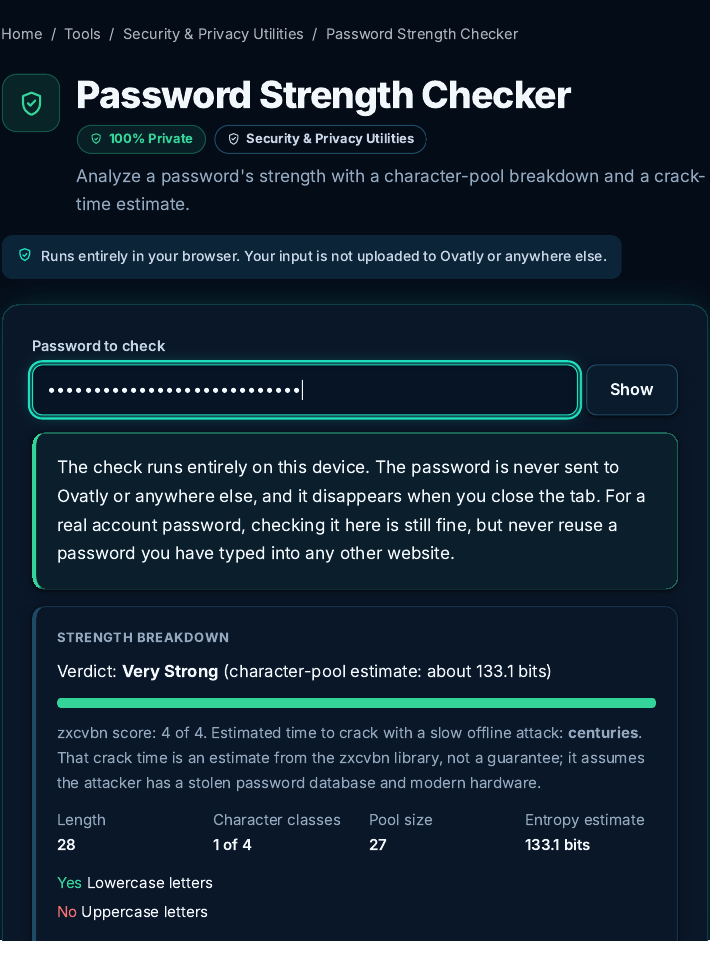 The checker's verdict on the famous example phrase. Read the analysis below before trusting it. Screenshot: genuine capture from the live Ovatly staging website, 9 November 2026.
The checker rated it "Very Strong": a character-pool estimate of about 133.1 bits, a zxcvbn score of 4 of 4, and an estimated crack time of centuries for a slow offline attack. Taken at face value, that verdict is wrong in every way that matters, and understanding why is the most useful lesson in this guide.
The 133.1-bit figure is arithmetic, not a measurement of this phrase. The checker computed it from its own reported figures: a character-pool estimate for a hypothetical 28-character string drawn randomly from the 27-character pool the checker reports (the 26 lowercase letters plus the space). It answers the question "how hard would a random string of that length, drawn from that pool, be to guess?" But this phrase is not random: it is widely published and appears in password dictionaries and breach collections. An attacker using those lists may find it immediately. zxcvbn's 4 of 4 has the same blind spot here: it models patterns, sequences and common words, but it does not screen the input against lists of known, leaked or famous passwords, and neither does this checker. That screening is exactly what NIST requires of the systems that set passwords, and its absence is a real limitation of checker tools generally, including ours; we have reported it separately as a product limitation for a founder decision, and no checker score in this guide should be read as a security clearance.
NIST makes the underlying point itself: estimating the entropy of user-chosen passwords is genuinely difficult, because people choose predictably. So use checkers for what they are good at (catching short, patterned, low-variety passwords, and comparing the effect of length) and never as a verdict that a specific password is safe. And build passphrases the way this guide's route two describes: words selected randomly, never a famous phrase, a quote, or words you picked because they sing.
One practice note: the checker runs locally in your browser and sends nothing anywhere. Even so, the safe habit is to test practice phrases rather than real passwords, and to paste real passwords only into tools you trust on your own device.
The habits that matter most: uniqueness, managers, MFA
Generation is the easy part. The system around the password is what actually protects you.
Uniqueness. A unique password per account means one site's breach cannot unlock your email, which is the master key that resets everything else. Reuse is the single most damaging habit, ahead of any question of password cleverness.
A password manager. Nobody can memorise fifty unique 20-character passwords, and they are not meant to. A password manager stores them in an encrypted vault, fills them in for you, and leaves you exactly one password to remember: the master passphrase, which is where route two earns its place. Use a reputable manager and protect it well.
Multi-factor authentication (MFA). Turn it on for email first, then banking, then everything that offers it. With MFA on, a stolen password alone is not enough to get in. Authenticator apps or hardware keys are stronger than text-message codes, but any second factor is far better than none.
Limitations and honest cautions
The generator creates passwords; it does not store them, and neither does this website. If you close the tab without saving a generated password somewhere safe, it is gone, which is by design. The strength checker's numbers are estimates based on models of attacker behaviour (it uses the zxcvbn library alongside a character-pool estimate); treat them as guidance, not promises. Its stated limitation, shown in the worked example above: it does not screen against known, leaked or famous passwords, so it can score a publicly known phrase at the top of its scale. And no password, however strong, protects an account on a service that stores passwords badly or a device that is already compromised, which is why the habits above matter as much as the password itself.
Common mistakes
- Reusing one good password everywhere. One breach hands attackers the key to every account that shares it.
- Personal details. Names, birthdays, pets and teams are the first things tried, and much of it is public.
- Pattern substitutions. Replacing a with @ and o with 0 is a pattern attackers test early; it adds little.
- Using published example passwords. If it appears in an article, a book or a comic, it is in the dictionaries.
- Sharing passwords by message or email. Send nothing you would not want forwarded; use the sharing features built into password managers instead.
- Skipping MFA on the email account. Email resets everything else. Protect it first.
Troubleshooting
A site rejects the generated password. Some sites cap length below 20 or forbid certain symbols. Shorten the length a little or disable symbols in the generator for that site, and keep the longest, widest setting the site accepts.
I generated a password and lost it. It cannot be recovered from the tool, by design. Use the site's password reset, and this time save the new one in your manager before closing the tab.
The checker rates my password weaker than I expected. Length is usually the fix: extend it rather than decorating it. Two more words on a passphrase, or four more characters on a generated password, move the estimate more than any symbol swap.
FAQs
How long should a password be? At least 15 characters when the password is the only factor (the NIST SP 800-63B-4 floor); the generator's default of 20 clears it comfortably. For passphrases, four or more randomly selected words in general use; for a master passphrase, at least six randomly selected words, which is the EFF's minimum recommendation.
Are passphrases really as strong as random passwords? A random character password of the same length has more possibilities, but a passphrase of randomly selected words (four or more in general use; at least six for a master passphrase, the EFF's minimum recommendation) is strong enough for memorised use, and far better than a short "complex" password. The random selection is not optional decoration; self-chosen "random-feeling" words and familiar phrases are dramatically weaker, as the worked example shows. Use generated passwords wherever a manager can store them.
Does the generator send my password anywhere? No. Generation happens on your device using the browser's cryptographic random source, verified in the code for this guide. Nothing is transmitted or stored by the tool.
Should I change my passwords regularly? Current NIST guidance (SP 800-63B-4) prohibits routine forced changes: change a password when there is evidence of compromise, and prioritise uniqueness and MFA instead.
Is it safe to check a real password in the strength checker? The checker runs locally in your browser and sends nothing. Even so, the cautious habit is to check representative examples rather than your actual master password.
Conclusion
Strong passwords are a system, not a trick: long and unique, generated or built from unrelated words, stored in a manager, and backed by MFA on the accounts that matter. The Password Generator and Password Strength Checker handle the creating and checking on your own device. If you look after other people's accounts or devices as well, the wider Security Tools category collects the related utilities in one place.
References
- NIST Special Publication 800-63B-4 (2025), Digital Identity Guidelines: Authentication and Authenticator Management (15-character single-factor minimum, no composition rules, no routine forced changes, compromised-password screening): https://doi.org/10.6028/NIST.SP.800-63b-4
- Electronic Frontier Foundation, Dicewords: new wordlists for random passphrases (the six-word recommendation used in this guide): https://www.eff.org/dice
- OWASP Cheat Sheet Series, Authentication and Password Storage guidance: https://cheatsheetseries.owasp.org/cheatsheets/Authentication_Cheat_Sheet.html