Most disappointing AI answers are not the model's fault. They are the predictable result of a prompt that left everything important unsaid: who the answer is for, what exactly is wanted, what the model should not do, and what shape the answer should take. The model fills those gaps with averages, and averages read as bland, generic text.
The fix is not a secret incantation. It is structure. A well-built prompt has five parts: a role, a task, context, constraints, and an output format, plus a tone when tone matters. This guide explains each part, then shows a genuine before-and-after using the free Prompt Builder on Ovatly, a simple tool that assembles those parts into one clean prompt you paste into whatever AI chat you use. One honesty note up front, in the tool's own spirit: the builder contains no AI. As its page states, it is "template assembly only... No AI model writes, rewrites or improves anything here." The thinking is yours; the builder just stops the pieces getting lost.
Contents
- Quick answer
- Why vague prompts produce vague answers
- The five parts of a strong prompt
- How to assemble a prompt, step by step
- Worked example: before and after
- Adjusting the result: iterate like an editor
- Limitations and honest expectations
- Common mistakes
- Troubleshooting
- FAQs
- Conclusion
- References
Quick answer
Write prompts in five parts. Role: who the AI should act as. Task: the one job to do, stated as a verb and an outcome. Context: the background facts the AI cannot know. Constraints: what to avoid, include or stay within. Output format: the exact shape of the answer (length, structure, tone). The Prompt Builder gives you a field for each part, assembles them live into a tidy prompt with headings, and lets you copy it or download it as a text file. Then paste it into your AI chat tool, read the answer like an editor, and improve the prompt rather than starting over when the answer misses.
Why vague prompts produce vague answers
A chat AI predicts a plausible response to what you wrote, in the situation it infers from your words. "Write a reply to a customer" does not say which customer, what happened, what your company already did about it, how long the reply should be, or what it must never say. The model still answers; it just answers a generic version of the request. Every missing decision becomes the model's guess.
A structured prompt is simply you making those decisions yourself and writing them down. That is the whole technique. It works on any capable chat model, because all of them respond to clear roles, concrete context and explicit formats, a point both OpenAI's and Anthropic's official prompt guidance make in their own documentation.
The five parts of a strong prompt
Role sets the standpoint. "You are an experienced customer support lead" primes vocabulary, priorities and judgement appropriate to that job. Roles help most when the task has a professional standard to meet; they are not magic, and a role never substitutes for the facts in the context.
Task is the job, in one or two sentences, with a verb and a visible outcome: "Write a polite reply to a customer whose order arrived five days late." If the task needs two unrelated things done, split it into two prompts; models follow one clear job better than a tangle.
Context is everything true about your situation that the model cannot see: what happened, what you already tried, who the reader is, the facts the answer must use. Context is where most weak prompts fail, because writers assume the model shares their situation. It does not.
Constraints fence the answer in: length limits, things that must not be said, requirements that must appear, sources or styles to stay within. Constraints are also where honesty lives in business writing: "do not blame the courier by name" is a real instruction a human would give a colleague, and the model should get it too.
Output format decides the shape: an email under 120 words, a table, three bullet points, a headline plus two sentences. Format requests are followed closely by modern models, so ask for exactly the artefact you intend to use, not a rough draft you will have to reshape.
Tone, the builder's sixth field, is a format for voice: friendly and professional, plain and direct, formal. Name the tone you would use yourself in that situation.
How to assemble a prompt, step by step
- Open the Prompt Builder. You will see six labelled fields: Role, Tone, Task, Context, Output format and Constraints (one per line).
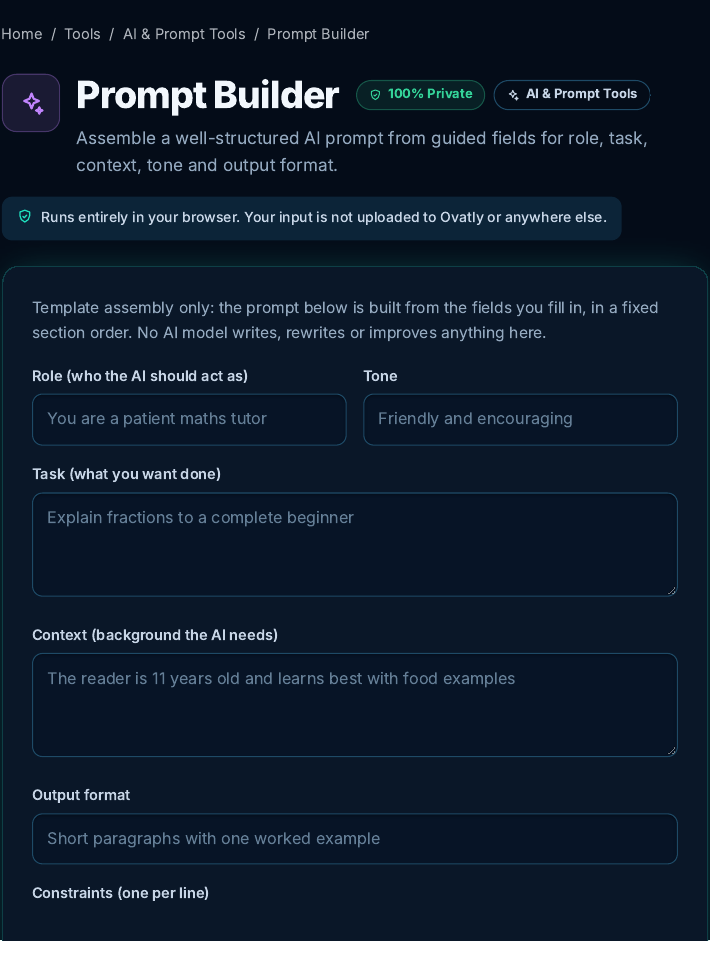 The builder before anything is typed. Screenshot: genuine capture from the live Ovatly staging website, 9 November 2026.
- Fill in the task first, in one clear sentence. Then add the context the AI cannot know, the constraints it must respect, the role and tone, and finally the exact output format.
- Watch the assembled prompt build itself below the fields as you type. The builder orders the sections Role, Task, Context, Tone, Output format, Constraints, each under its own heading.
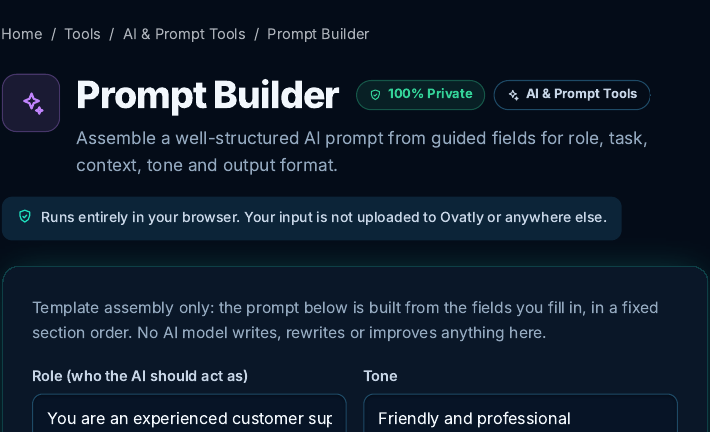 Filling the fields for the worked example below. Screenshot: genuine capture from the live Ovatly staging website, 9 November 2026.
- Click "Copy result" and paste the prompt into your AI chat tool. (There is also a Download .txt button if you want to keep a library of your best prompts.)
Worked example: before and after
Here is the exact exercise we ran for this guide. The "before" prompt is the sort of thing most people type:
Write a reply to a customer whose order arrived late.
It says nothing about the delay's cause, what the company has done, the tone, the length, or what to avoid, so any answer it earns will be generic filler the writer must heavily edit.
The "after" is the prompt the builder assembled from our fields, reproduced exactly as the tool output it:
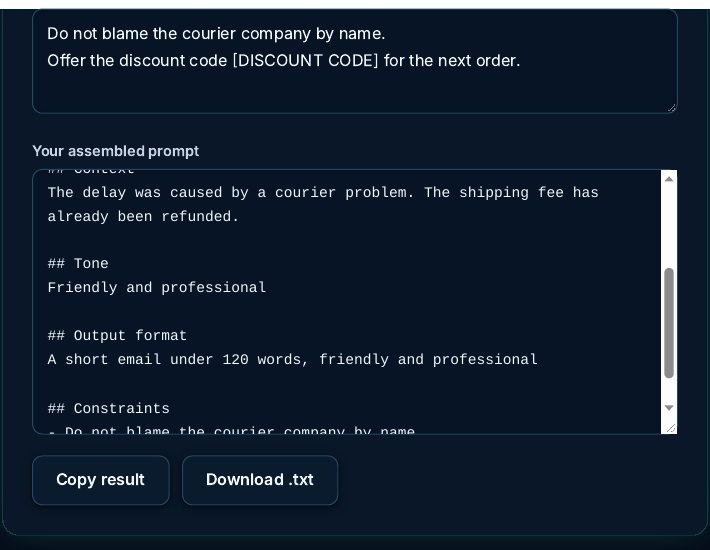 The assembled prompt state, recaptured for the final review pass so the screenshot and the written prompt match exactly, including the [DISCOUNT CODE] placeholder in the constraints. Screenshot: genuine capture from the live Ovatly staging website, 9 November 2026.
## Role
You are an experienced customer support lead.

## Task
Write a polite reply to a customer whose order arrived five days late.

## Context
The delay was caused by a courier problem. The shipping fee has already been refunded.

## Tone
Friendly and professional

## Output format
A short email under 120 words, friendly and professional

## Constraints
- Do not blame the courier company by name.
- Offer the discount code [DISCOUNT CODE] for the next order.
One deliberate choice is worth copying. The constraint offers the discount as an explicit placeholder, [DISCOUNT CODE], rather than a vague "10 percent discount code": a percentage with no code invites the AI to invent one that may not exist. In real use, paste the actual code into the prompt, or keep the placeholder and fill it in yourself afterwards. (An earlier capture of this example used the vague wording; the screenshot above was recaptured with the placeholder so that the image and the prompt printed here match exactly.)
Notice what changed. The model now knows the delay was five days, that shipping is already refunded (so it will not offer it again), that it must not name-blame the courier, that a discount code should appear, and that the deliverable is a short email, not an essay. We are not reproducing any AI's answer here, because answers vary by model and by run; the improvement this guide claims is in the prompt itself, and you can judge that directly: every fact a human colleague would need is present, and nothing is left to guesswork that matters.
Adjusting the result: iterate like an editor
Treat the first answer as a draft, and fix it by editing the prompt, not by arguing in circles. If the answer is too long, tighten the format field. If it invents facts, add a constraint: "Use only the facts in the context; if something is not stated, leave it out." If the tone is off, name the tone more precisely. Save the prompts that work; a small personal library of proven prompts is worth more than a folder of articles about prompting.
Limitations and honest expectations
A structured prompt raises the floor of what you get; it does not guarantee brilliance, and no prompt technique makes a model know facts it does not have or verify claims for you. Check anything factual an AI writes before you rely on it. The Prompt Builder is a template tool: it does not call an AI, improve your wording, or send your text anywhere (its assembly happens locally in your browser, which we verified in the code for this guide). What you type into your AI chat afterwards is governed by that service's own privacy terms, so do not paste confidential material into a consumer chat tool unless your organisation permits it.
Common mistakes
- Asking for several jobs at once. One prompt, one task; sequence the rest.
- No context. The model cannot see your order system, your reader or your situation. Write it down.
- No format. "Write something" earns an essay when you needed three lines.
- Contradictory instructions. A "short, detailed, exhaustive, brief" answer satisfies none of the four.
- Politeness padding instead of information. Length in a prompt should be facts and fences, not filler.
- Starting over after a weak answer. Edit the prompt; the iteration is where the skill compounds.
Troubleshooting
The answer is generic despite a structured prompt. The context is usually too thin. Add the specific facts: numbers, names of things (not people), what already happened, what the reader cares about.
The model ignores a constraint. Move it earlier, state it as a direct instruction, and repeat it in the format line if it is critical (for example, "under 120 words" in both constraints and format).
The output format is not followed. Ask for the structure explicitly with headings or a skeleton to fill in, and remove competing instructions that suggest a different shape.
FAQs
Does the Prompt Builder use AI to improve my prompt? No. In its own words, it is template assembly only: it arranges your text into fixed sections. Nothing is rewritten, and your text is not sent anywhere.
How long should a prompt be? As long as the facts and fences require, and no longer. Most working prompts land between a short paragraph and a headed page.
Does this structure work on every AI chat tool? Yes. Role, task, context, constraints and format are plain instructions any capable chat model can follow; the builder's output is ordinary text you paste anywhere.
Should I always use all six fields? No. Use the ones the task needs. A quick factual question may need only a task and a format; a customer-facing draft usually earns all six.
Conclusion
Better prompts are not a talent; they are a checklist. Decide the role, state one task, supply the context, fence it with constraints, demand the format, and iterate like an editor. The Prompt Builder keeps that checklist in front of you and assembles the result cleanly. Keep your proven prompts in a small library of your own (the builder's Download .txt button helps), and browse the rest of the AI and Prompt Tools category for the surrounding utilities.
References
- OpenAI, Prompt engineering guide (official documentation): https://platform.openai.com/docs/guides/prompt-engineering
- Anthropic, Prompt engineering overview (official documentation): https://docs.anthropic.com/en/docs/build-with-claude/prompt-engineering/overview